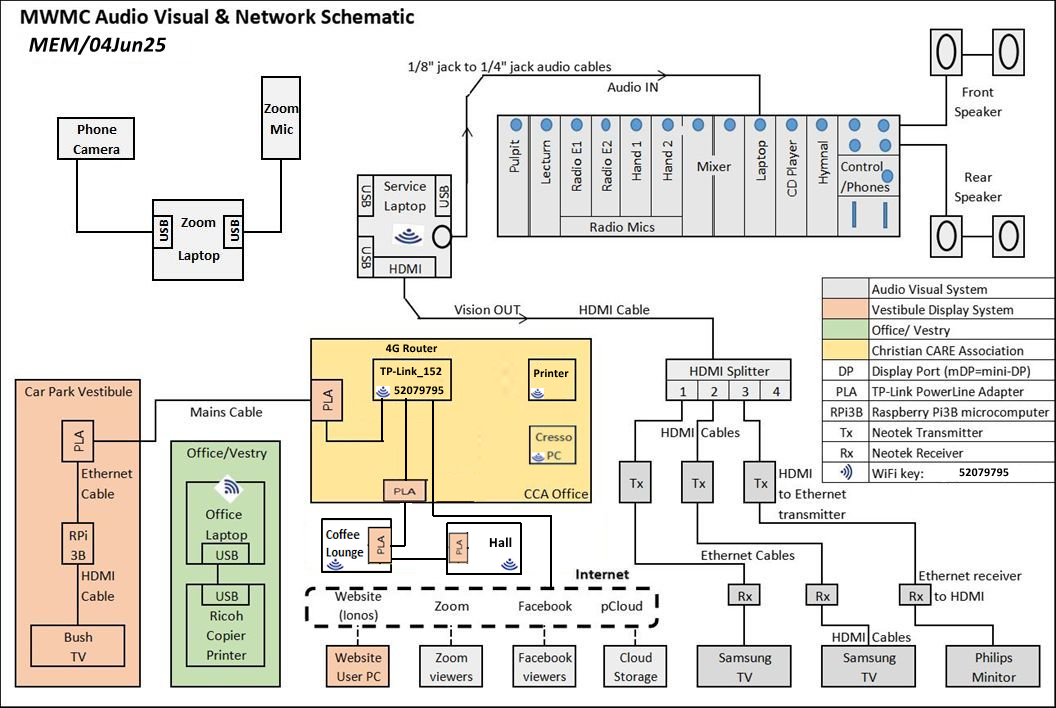
Not all laptops have a convenient, full size HDMI port to connect an HDMI cable to the HDMI splitter. Some have a mini-HDMI port, others have a Display Port (DP) or mini-Display port (mDP). So an appropriate adapter must be used if that is the case.
From the HDMI splitter each outbound port is connected by a short HDMI cable to a Neotek HDMI extender transmitter (Tx). This in turn is connected by a long Ethernet cable to its corresponding Neotek HDMI extender receiver (Rx) which in turn is connected by a HDMI cable to the HDMI port on the TV/monitor.
The system is set up this way because an HDMI signal will not travel reliably over long cables (>7.5m) which is why we use Ethernet cables and Rx/Tx boxes as intermediaries to cover the distances.
Recent technology allows HDMI signals to be transmitted wirelessly using wireless version of the transmitter and receiver, cutting out the need for intermediary Ethernet cables. These were not available when we put the system together.
We have 2 x 55” Samsung smart televisions and 1 x 55” Philips monitor installed.